How to make UGC ads for free
Guide · October 2026
A “UGC ad” is an ad that looks like a normal person’s post: a phone-shot product, someone talking over it, big captions, nothing polished. You don’t need to hire a creator to make one, and you don’t need an AI avatar either. You need a few photos of the thing, about 15 seconds of script, and a voice.
Here’s how I’d do it with no budget.
1. Shoot 3–6 photos on your phone
- Use a real place: a kitchen counter, a desk, a bathroom shelf. Window light, no studio.
- One wide shot of the product in use, one close-up of the detail you’ll talk about, one of it in someone’s hand.
- Shoot vertical. TikTok and Reels are 9:16 (1080×1920).
2. Write a 15-second script in 4 lines
Most UGC ads follow the same shape. Write it the way you’d text a friend:
- Hook (first 2 seconds): a line that makes someone stop. “Everyone who comes over asks where I got this.”
- What it is: one sentence. “It’s a stoneware pour-over.”
- Why it’s good: one or two concrete details. “It holds heat, so the coffee stays hot the whole pour.”
- What to do: “Link in bio.”
Read it out loud. If it takes more than 20 seconds, cut words.
3. Get a voice
Three free options:
- Your own voice. Record it on your phone in a closet or under a blanket (less echo). This usually performs best because it sounds real.
- A friend’s voice. Same thing, just ask.
- A free text-to-speech voice. Fine for testing. If you post it, label it (see step 6).
4. Put it together in any free editor
- Lay the photos on a 9:16 timeline, about 2–4 seconds each. Add a slow zoom so it doesn’t feel like a slideshow.
- Drop the voice on top and cut each photo to the line it matches.
- Add captions. Word-by-word captions in the middle of the screen are the TikTok default for a reason: most people watch with sound off.
- Put a short text box at the top with the hook, so it reads even on mute.
- Keep text out of the bottom ~20% and the right edge. That’s where TikTok puts the caption, buttons and username.
5. Export and check it on your phone
Send the MP4 to your phone and watch it like a stranger would, sound off. If you don’t get the point by second 3, change the hook.
6. Don’t skip the rules
- Don’t fake a customer. A UGC-style ad is fine. Pretending a stranger reviewed your product when they didn’t is a fake review, and in the US the FTC treats that as a violation (16 CFR Part 465).
- Label AI voices. TikTok asks you to label realistic AI-generated content. Turn on the “AI-generated content” setting when you post.
- Mark it as an ad if you’re promoting your own or a client’s product (TikTok’s “Content disclosure” toggle).
Where it gets slow
The free route works. The slow part is step 4: lining up captions word by word, getting the text boxes right, and redoing it all when you change one line or want a 4:5 version for Instagram feed.
That’s the part UGC Reel Kit does. You fill in a form (photo + what it says + what’s on screen, per scene), pick one of 8 templates, and it builds the video in your browser: word-by-word captions, TikTok-style text boxes, 15 free English voices (or your own recording), and 9:16, 4:5 or 1:1 output. The MP4 is rendered on your laptop, nothing is uploaded, and there’s no watermark.
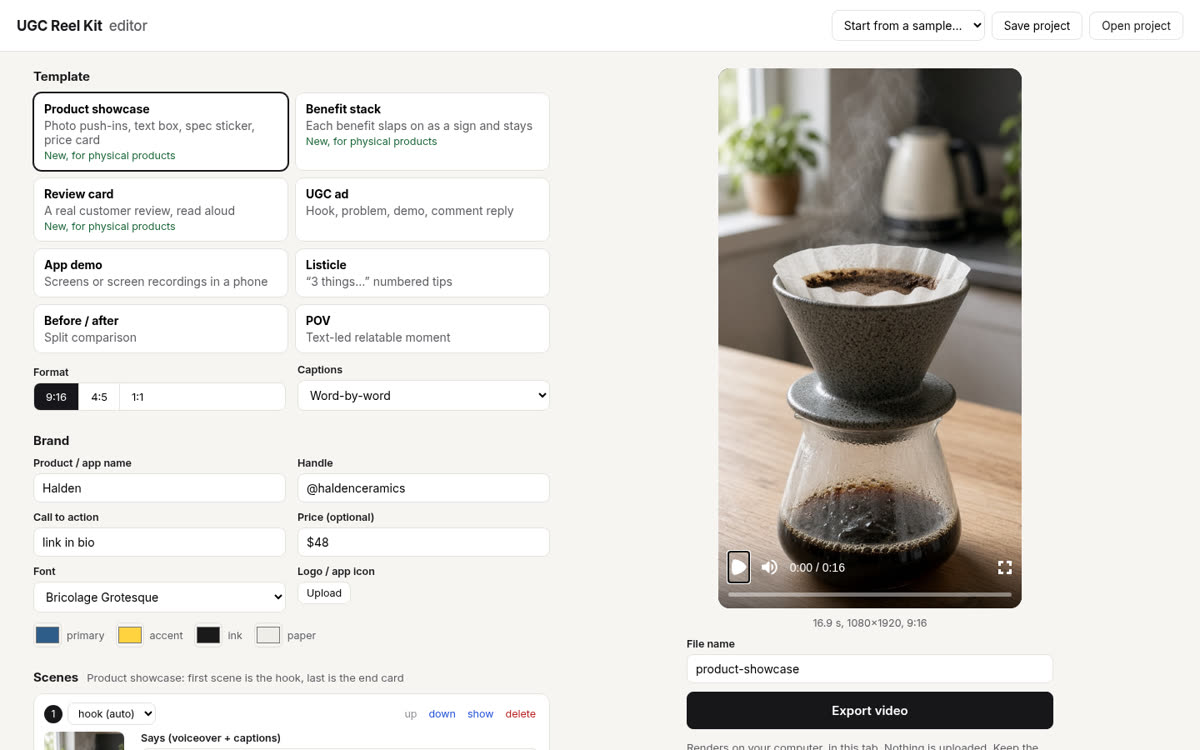
It’s not free: it’s $24, once. If you make more than one or two ads, it’s cheaper than an hour of your time, and much cheaper than AI-avatar tools that charge every month. If you only need one ad, use the free route above.
The short version: UGC Reel Kit is a form in your browser. Add photos or screen recordings, type what the voice should say, pick a template, export an MP4. It costs $24 once (no monthly fee, no watermark, 14-day refund).
See pricingMore guides
How to make an app promo video from screen recordingsHow to make a product video for TikTok from photos