How to make an app promo video from screen recordings
Guide · October 2026
If you built an app, you already have everything you need for a promo video: the app. A short screen recording, a voice explaining one problem it fixes, and big captions. No actors, no motion designer.
1. Pick one job the app does
Not a feature tour. One thing a person wants to get done, start to finish. For a grocery list app: “add everything for tonight’s dinner in 10 seconds”. People scroll fast, so it has to be one clear thing.
2. Record 3–5 short clips
- Use the phone’s built-in screen recorder (iOS: Control Center → Screen Recording; Android: Quick Settings → Screen record).
- Turn on Do Not Disturb so no notifications pop up, and use clean demo data.
- Keep each clip 2–5 seconds: open, tap, result. Move your finger slower than feels natural.
- Record the “before” too: the messy notes app, the 14 open tabs. Contrast sells.
3. Script it in 4 lines
- Hook: the problem, said like a person. “I used to forget half the groceries.”
- Show: “So I made a list that sorts itself by aisle.”
- Proof: one thing that’s easy to see on screen. “Type it once, it’s grouped.”
- Ask: “It’s free on the App Store.”
4. Pick a format that fits the clip
| Format | Good for |
|---|---|
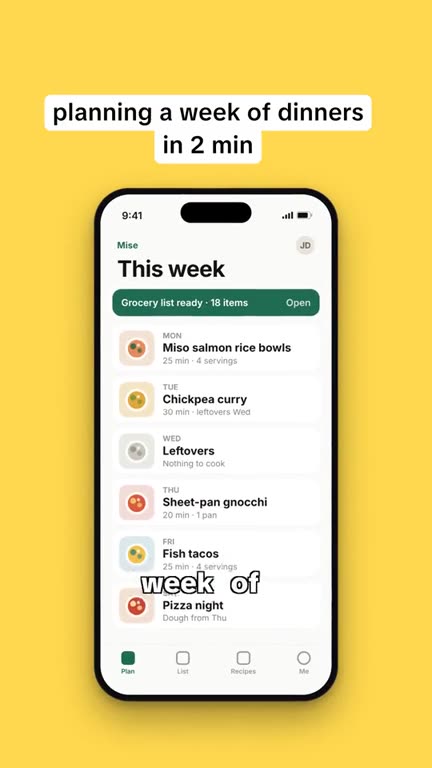
| App demo | Phone frame on a colored background, step-by-step. Clear and simple. |
| Before / after | Old way vs. your app, split in time. |
| POV | “POV: you finally have a list that…” Feels native on TikTok. |
| Listicle | “3 apps that…”, with yours as one of them. |
| UGC ad | Talking over the recording like a regular user. |
5. Edit
- Put the recording inside a phone frame if you’re on a 9:16 canvas, so it doesn’t look like a cropped screenshot.
- Captions word by word, high contrast. Most people are on mute.
- Keep text away from the bottom and right edge on TikTok (that’s where the UI sits).
- 15–30 seconds total. End on the app icon and one line.
You can do all of this in any free editor. It just takes a while to line up the phone frame, the captions and the cuts, and longer when you change a line.
Doing it with UGC Reel Kit
UGC Reel Kit has the five formats above as templates (app demo, before/after, POV, listicle, UGC ad), plus three for physical products. You drop in your screen recordings or screenshots, type what the voice says and what’s on screen, and it builds the video: phone frame, word-by-word captions, a free in-browser voice or your own recording, and 9:16, 4:5 or 1:1. Export is an MP4 rendered on your laptop.
If you’re a developer, the Developer plan ($59) includes the full React + Remotion source, so you can change the templates, batch-render from a spreadsheet, or run it on your own server.
One note: the editor needs Chrome or Edge on a laptop. You can’t edit on a phone.
The short version: UGC Reel Kit is a form in your browser. Add photos or screen recordings, type what the voice should say, pick a template, export an MP4. It costs $24 once (no monthly fee, no watermark, 14-day refund).
See pricingMore guides
How to make UGC ads for freeHow to make a product video for TikTok from photos